MostMate AI Anti-Detect Browser: Secure Multi-Account Management + ProxyTee Setup Guide
Explore how MostMate isolates cookies, fingerprints, and AI-automated multi-account workflows—and learn step-by-step how to configure ProxyTee’s unlimited residential proxies in MostMate Proxy Manager.
Learn how MostMate isolates cookies, fingerprints, and AI multi-account workflows, plus step-by-step SOCKS5/HTTP setup with ProxyTee unlimited residential proxies.
- •Meet MostMate: AI-Powered Browser Isolation for Multi-Account Teams
- •Core Capabilities Built for E-Commerce, Social Media & Advertising Teams
- •Step-by-Step: How to Configure ProxyTee Proxies in MostMate
- •Why Pair MostMate with ProxyTee’s Unlimited Residential Proxies?
- •Get Started with MostMate and ProxyTee
Managing multiple storefronts, social media brands, or client ad accounts from a standard browser quickly runs into two walls: shared cookies and overlapping network signals. Even when teams open separate browser tabs, local storage, device fingerprints, and IP addresses remain tied together. Today, we are pleased to welcome MostMate to the ProxyTee Official Technology Partner Ecosystem.
MostMate is an AI-powered anti-detect browser built for safe multi-account management on Windows and macOS. When you pair MostMate’s isolated browser environments with ProxyTee’s 30M+ rotating residential proxies, your e-commerce, social media, and advertising teams get clean environment boundaries and unmetered household bandwidth at flat monthly port pricing.
Meet MostMate: AI-Powered Browser Isolation for Multi-Account Teams
Traditional anti-detect browsers often leave operators wrestling with complex fingerprint toggles before they can launch a single account. MostMate takes a guided workspace approach: each account runs inside an independent browser profile with its own cookies, local storage, login session, fingerprint parameters, and assigned proxy configuration.
Beyond profile isolation, MostMate unifies AI-powered operational assistance, Account Health checks, RPA automation, bulk profile actions, a Local API, and role-based team collaboration inside one desktop workspace—making it accessible for beginners while giving experienced teams the controls required to scale safely.
Core Capabilities Built for E-Commerce, Social Media & Advertising Teams
Whether your team manages regional marketplace stores, client ad accounts, or multi-brand social calendars, MostMate organizes environment setup and daily execution into four core pillars.
1. Independent Browser Environments & Realistic Fingerprint Isolation
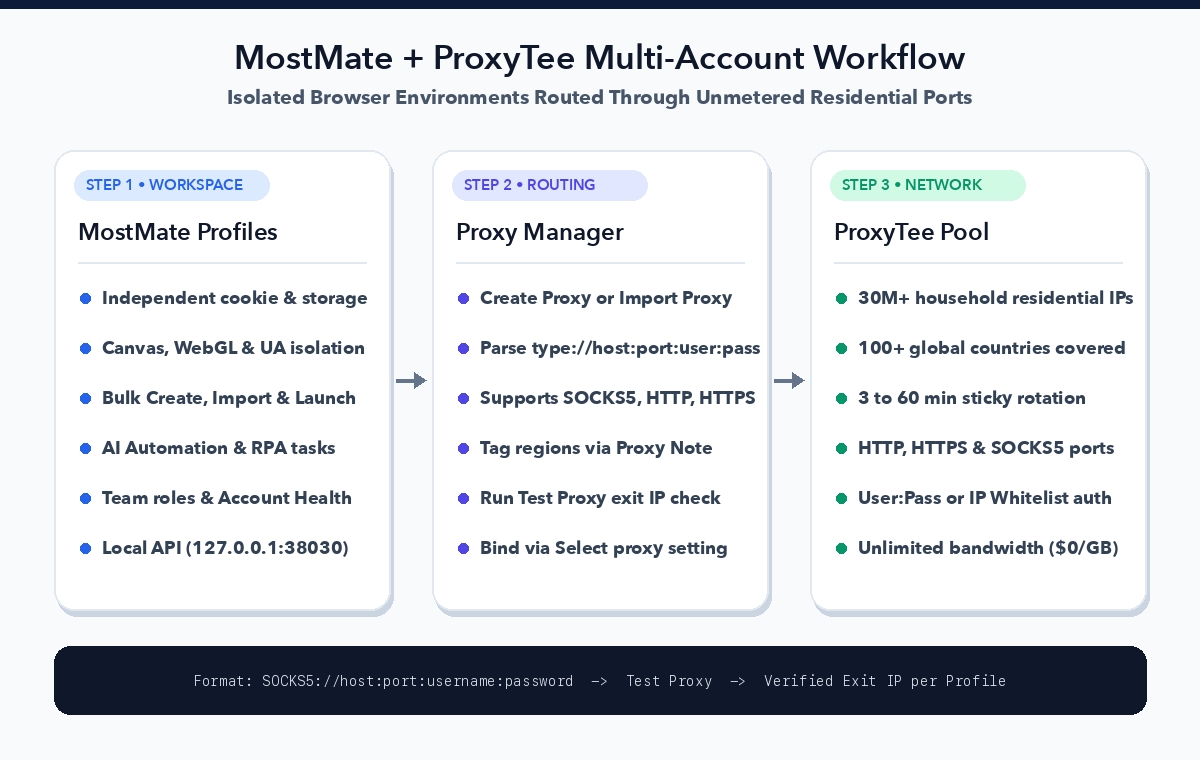
Each MostMate profile maintains strictly separated cookies, cache, storage, and login state alongside configurable browser identity signals including Canvas, WebGL, User-Agent, and network context. Keeping every profile bound to its own residential proxy prevents accidental session overlap when team members switch between stores or ad managers throughout the day.
2. AI Automation, RPA & Local API Integration
Repetitive warm-up sequences, routine navigation checks, and scheduled storefront tasks add up quickly across dozens of accounts. MostMate combines built-in AI assistance and RPA automation with a Local API running on http://127.0.0.1:38030, allowing engineering teams to query, create, update, start, and stop isolated browser profiles programmatically from external scripts.
3. Bulk Profile Management & Batch Operations
Inside MostMate’s bulk management view, operators can prepare, import, group, launch, and close multiple profiles in defined selections across commerce, brand, or client workspaces. A shared team workspace never merges browser storage—every selected profile retains its own independent environment and proxy route.
4. Account Health Visibility & Team Collaboration
MostMate pairs environment organization with Account Health monitoring and granular team permissions so agencies and growth teams can delegate daily account operations without sharing raw passwords or risking cross-profile contamination.
Step-by-Step: How to Configure ProxyTee Proxies in MostMate
MostMate includes a dedicated Proxy Manager that lets you store, test, label, and reuse proxies across browser environments. Follow these steps to connect your ProxyTee Unlimited Residential Ports (visit our MostMate Proxy Integration Guide for a compact quick-reference card).
Step 1: Prepare Your ProxyTee Port Credentials
Log in to the ProxyTee Dashboard, open your Unlimited Residential Port, choose your target country from 100+ supported locations, and set the auto-rotation timer to 30–60 minutes for stable sticky sessions. Copy the assigned Address:Port, Username, and Password, and note whether you are connecting over SOCKS5 or HTTP. (Hostnames such as gate.proxytee.com:1080 shown below are format placeholders—always use the exact endpoint assigned in your dashboard.)
Step 2: Create or Parse a Proxy in MostMate Proxy Manager
- Open the MostMate desktop client and select Proxy Manager in the left-hand navigation menu, then click Create Proxy.
- Paste your full connection string into the Proxy Parsing field using the format
type://host:port:username:password(for example,SOCKS5://gate.proxytee.com:1080:username:password) and click Parse Proxy, or enter the protocol (SOCKS5,HTTP,HTTPS, orSSH), IP/domain, port, username, and password manually. - Add a descriptive Proxy Note (such as
ProxyTee-US-Port-01) so your team can identify regions and port assignments quickly. - Click Test Proxy to confirm connectivity and verify the exit IP matches your selected region, then click Confirm to save.
Step 3: Bulk Import Ports & Assign to a Browser Environment
When provisioning multiple ports at once, click Import Proxy on the Proxy Manager page and paste one entry per line. Keep in mind that lines without an explicit protocol prefix default to SOCKS5 in MostMate, so always prefix HTTP:// if you are importing HTTP endpoints:
# MostMate Import Proxy format (replace with your assigned ProxyTee port credentials)
SOCKS5://gate.proxytee.com:1080:username:password
HTTP://gate.proxytee.com:8080:username:password
After saving or importing, open a new browser environment in MostMate, go to Proxy Settings, choose Select proxy (or Custom proxy for a one-off entry), pick your verified ProxyTee port, launch the profile, and confirm the live public IP inside the browser window.
If your team automates profile launches with MostMate’s Local API (available on Professional plans and above), you can verify the local service is active before running workflows:
import json
from urllib.request import urlopen

with urlopen("http://127.0.0.1:38030/healthz", timeout=15) as response:
    result = json.load(response)
if result["code"] != 0:
    raise RuntimeError(result["msg"])
print(json.dumps(result["data"], indent=2))
Why Pair MostMate with ProxyTee’s Unlimited Residential Proxies?
Anti-detect browsers protect device fingerprints, cookies, and storage, while proxies protect network identity. Yet many multi-account teams hit unexpected costs because typical residential proxy providers bill $5 to $10 per gigabyte. Modern e-commerce dashboards, video uploads, ad previews, and social feeds consume hundreds of megabytes per profile each day.
- Predictable $0/GB Bandwidth: ProxyTee Unlimited Residential Ports start at $29/month (1 Port), $129/month (5 Ports), and $449/month (25 Ports) with zero traffic metering—ideal for high-bandwidth social media management and ad campaign operations.
- 30M+ Household IPs Across 100+ Countries: Match every MostMate profile to authentic consumer ISP ranges in the US, UK, Germany, Singapore, Canada, and beyond without regional price surcharges.
- Flexible Authentication & Sticky Control: Switch between
Username:PasswordandIP Whitelistauthentication per port and tune rotation from 3 to 60 minutes directly in your dashboard or via the ProxyTee REST API.
Get Started with MostMate and ProxyTee
Ready to unify AI-powered browser isolation with unmetered residential bandwidth? Download MostMate and create your workspace, then check ProxyTee’s Unlimited Residential Port plans or read our MostMate Proxy Integration Guide to connect your first isolated profile in minutes.
Frequently Asked Questions
MostMate is an AI-powered anti-detect browser for Windows and macOS built for e-commerce, social media, and advertising teams. It isolates cookies, browser fingerprints, and proxies in independent environments per account while combining AI automation, bulk profile management, Account Health, a Local API, and team permissions.
Principal infrastructure engineer at ProxyTee specializing in rotating residential proxy networks, SOCKS5/HTTP tunneling, TLS fingerprint mitigation, and distributed data extraction pipelines.